


If you’ve ever tried to configure HTTP security headers manually, you know it requires manually editing your server config files or adding a code snippet to your site. One wrong move and you could break a site or lose essential functionality.
With the new Security Headers feature in Solid Security Pro, that complexity is gone.
Protection That Reaches the Browser
Security Headers are critical for protecting your site visitors against browser-based attacks like clickjacking, code injection, and data leakage. These settings tell the browser what to allow, what to block, and how to behave when loading your site.
But until now, implementing these headers meant editing Apache or NGINX server config files – a risky and inaccessible process for many WordPress users.
Solid Security Pro now brings these protections into a simple settings interface.
Included Headers:
- X-Frame-Options: Prevents your site from being embedded in malicious iframes.
- X-Content-Type-Options: Blocks dangerous content type guessing by browsers.
- Referrer-Policy: Controls how much data is passed to external sites when links are followed.
- Content-Security-Policy: Restricts where browsers can load scripts, styles, and other resources from.
Simple UI, Powerful Control
These headers are sent via PHP by default, so they’re safe to experiment with. Prefer a server-level implementation? You can enable it with one toggle, and Solid Security will make the changes for you.
Even better, Solid Security Pro will scan your site daily and notify you if your header configuration is missing, broken, or unsafe. Issues appear in your dashboard and are flagged as critical in your logs.
How to Enable and Configure Security Headers
Step 1: Turn On Security Headers
Navigate to Solid Security ? Settings ? Advanced
You’ll find a new Security Headers toggle.
Enable the feature and expand the section to reveal configuration options.
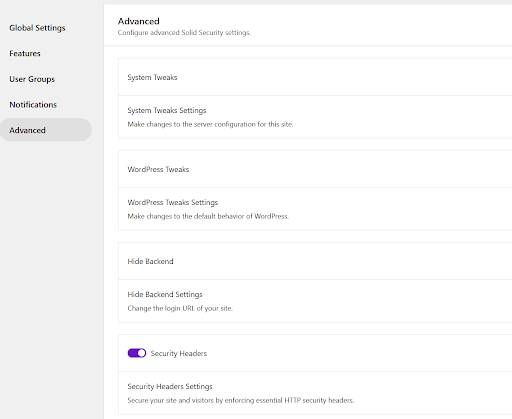
Step 2: Configure the Header Options
Once enabled, you’ll see five configuration settings.

Here’s what each setting does:
Use Server Configuration
By default, headers are sent via PHP. If you prefer Apache or NGINX to handle them directly, enable this option and Solid Security will update your server configuration automatically.
X-Frame-Options
Controls whether your site can be embedded in an iframe. This protects against clickjacking attacks designed to trick users into revealing login credentials.
X-Content-Type-Options
Prevents browsers from guessing file types. This reduces the risk of malicious files being executed as scripts.
Referrer-Policy
Limits what referral data is shared when visitors click links to other sites. This helps prevent accidental exposure of sensitive URL parameters.
Content-Security-Policy
Defines which domains browsers can load scripts, styles, and other resources from. This is one of the most powerful defenses against injected third-party code.
For advanced configurations, you can generate policies using tools like Report UI and paste them directly into the field.
Step 3: Automatic Daily Checks and Alerts
Security Headers aren’t just configurable – they’re monitored.
When the feature is enabled, Solid Security registers a daily scheduled check to verify your headers are present and properly configured.

If an issue is detected – such as missing or misconfigured headers – you’ll receive a notification directly in your dashboard.

Any detected problems are also surfaced in your logs and flagged as Critical, so you can address them immediately.

This means no manual audits. No surprises. Just proactive visibility.
Want deeper technical guidance or advanced configuration details? Explore the full Security Headers documentation.
Built for Pros Who Move Fast
If you’re managing client sites, this update boosts your productivity while strengthening each site’s security posture. It’s the kind of proactive control that turns emergencies into “already handled.”
Ready to Harden Your Site?
This feature is available now in Solid Security Pro – and included in Solid Suite for even more protection and time-saving tools.
Join us for the next Solid Academy Webinar!
Free weekly webinars that will help you master WordPress and increase your business's bottom line.
What is a WordPress Phishing Attack?
Learn how to identify and prevent phishing attacks on WordPress websites.
Kiki SheldonWebsite Protection: 5 Ways to Keep Your Website Safe
Robust website protection is the shield that stands between your business and relentless cyber attacks. Prioritizing website protection enables businesses to fortify defenses to safeguard their online presence and preserve the trust of their customers in the face of ever-evolving cybersecurity threats.
Kiki Sheldon23 Ideas To Grow Your WordPress Business in 2023
WordPress is the most popular website-building platform worldwide, trusted by numerous brands. WordPress enables you to build a user-friendly and highly reliable site, together with tools and plugins to enhance your marketing and work like a lead magnet. All these features make WordPress the platform chosen by more than 43% of businesses globally.
SolidWP Editorial TeamSign up now — Get SolidWP updates and valuable content straight to your inbox
Sign up
Get started with confidence — risk free, guaranteed



