

New! iThemes Security Pro Adds Member Login Security for Restrict Content Pro
Today we want to share some powerful new WordPress security integrations between iThemes Security Pro, our WordPress security plugin, and Restrict Content Pro, our favorite WordPress membership plugin. As you may have heard, Restrict Content Pro recently joined the iThemes family. As our first big plugin integration announcement, we're excited to add the best account protection that iThemes Security Pro offers so your Restrict Content Pro members can secure their accounts and logins.

Today we want to share some powerful new WordPress security integrations between iThemes Security Pro, our WordPress security plugin, and Restrict Content Pro, our favorite WordPress membership plugin.
As you may have heard, Restrict Content Pro recently joined the iThemes family. As our first big plugin integration announcement, we’re excited to add the best account protection that iThemes Security Pro offers so your Restrict Content Pro members can secure their accounts and logins.
Restrict Content Pro + iThemes Security Pro: 5 New Advanced Account & Login Security Features
We are excited to announce that the Restrict Content Pro plugin can now tap into 5 of iThemes Security Pro’s advanced account security features to make Restrict Content Pro member accounts nearly impenetrable to attacks.
Here are the 5 ways you can now add member account security with the iThemes Security Pro plugin.
1. Password Requirements for Members
Passwords are the first line of defense from attacks on your member’s accounts. The Password Requirement feature in iThemes Security Pro is the fastest way to implement a password policy on your website.

The Password Requirements has 4 different settings to protect Restrict Content Pro accounts.
- Force Strong Passwords – Force a set of users to use a strong password.
- Password Expiration – Set the maximum number of days a password can be used before it is expired.
- Refuse Compromised Passwords – Force users to use passwords that have not appeared in any password breaches tracked by Have I Been Pwned.
- Force Password Change – Force all users to change their password upon their next login.
2. Add Two-Factor Authentication for Member Logins
The iThemes Security Pro Two-Factor Authentication feature can help protect your Restrict Content Pro accounts against 100% of automated bot attacks.
iThemes Security Pro has 3 methods of 2fa users can use to secure their accounts.
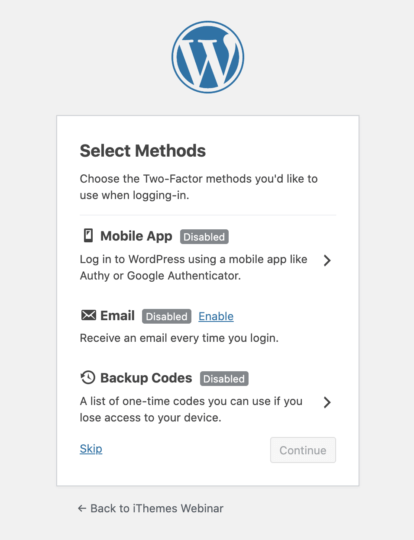
- Mobile App – The mobile app method is the most secure method of two-factor authentication provided by iThemes Security Pro. This method requires you to use a free two-factor mobile app like Authy.
- Email – The email method of two-factor will send time-sensitive codes to your user’s email address.
- Backup Codes – A set of one-time use codes that can be used to login in the event the primary two-factor method is lost.
3. Add reCAPTCHA to Member Logins
The Google reCAPTCHA feature in iThemes Security Pro protects your site from bad bots. These bots are trying to break into your website using compromised passwords, posting spam, or even scraping your content. reCAPTCHA uses advanced risk analysis techniques to tell humans and bots apart.
What’s great about reCAPTCHA version 3 is that it helps you detect abusive bot traffic on your website without any user interaction. Instead of showing a CAPTCHA challenge, reCAPTCHA v3 monitors the different requests made on your site and returns a score for each request. The score ranges from 0.01 to 1. The higher the score returned by reCAPTCHA, the more confident it is that a human made the request. The lower this score returned by reCAPTCHA, the more confident it is that a bot made the request.
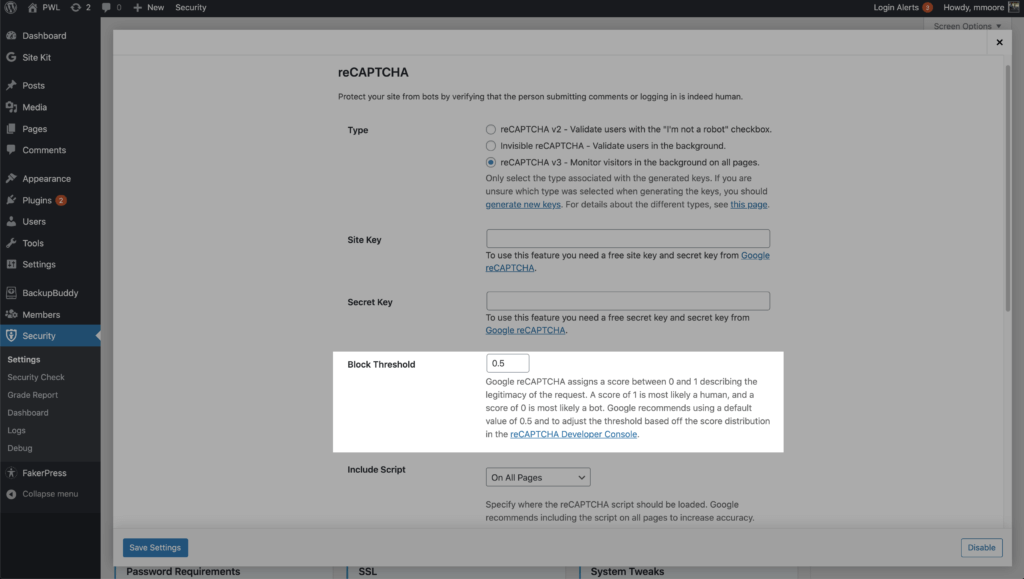
You can enable reCAPTCHA on your Restrict Content Pro registration, reset password, and account pages.
4. Magic Login Links for Members
Magic Links allow you to log in to your Restrict Content Pro account site while your username is locked out by the iThemes Security Local Brute Force Protection feature.
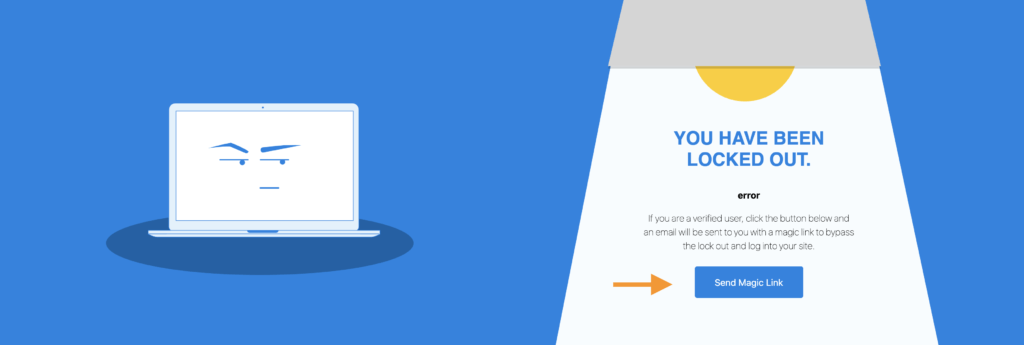
When your username is locked out, you can request an email with a unique login link. Using the emailed link will bypass the username lockout for you, while brute force attackers are still locked out.
5. Passwordless Logins for Members
Passwordless login is a new way to verify a user’s identity without requiring a password to login. We took the idea of Magic Links and evolved it into a new login method that allows you to login without ever entering a password or an extra authentication code.
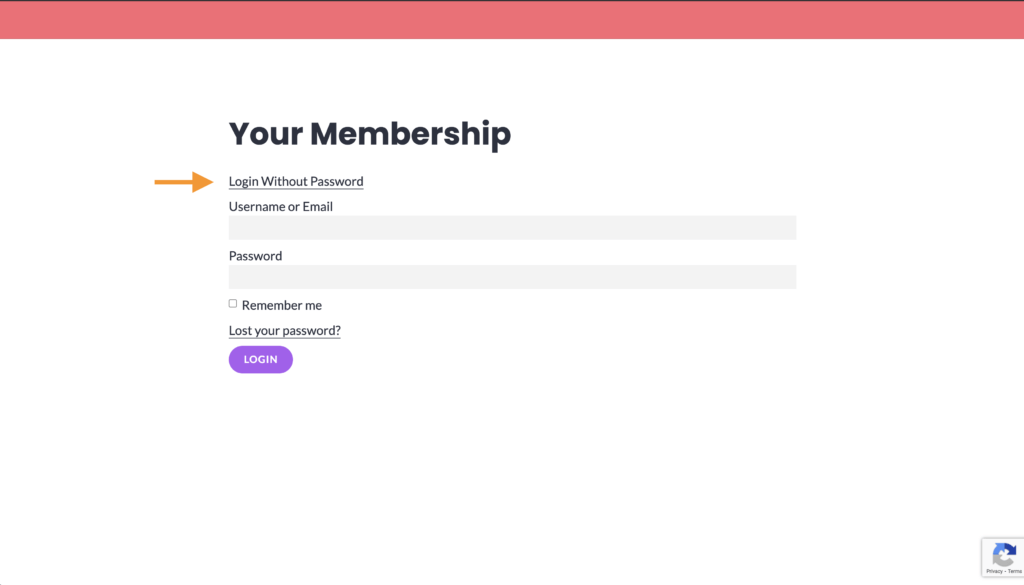
To use Passwordless Logins on your Restrict Content Pro login, check the box to enable the Restrict Content Pro integration.
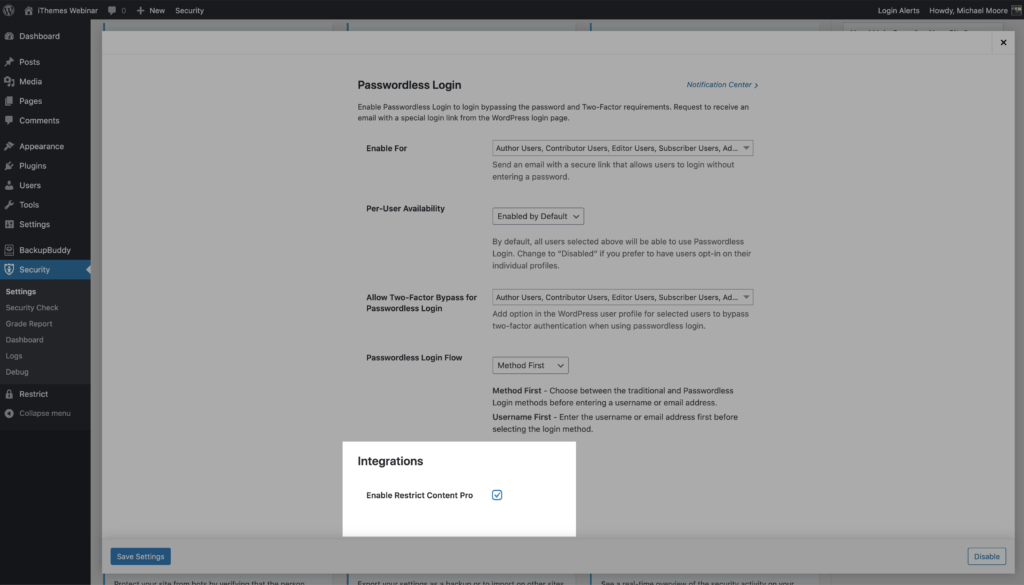
The next time you log into your Restrict Content Pro account, click the Login Without Password link to send the email containing the passwordless login link.
In your email inbox, open the Magic Link email and the Login Now button.

Wrapping Up: iThemes Security Pro + Restrict Content Pro = Secure Membership Sites
The combination of Restrict Content Pro and iThemes Security Pro makes for the most secure and full-featured WordPress membership solution. You can learn more about Restrict Content Pro here and see all the ways iThemes Security Pro secures your site here.
Join us for the next Solid Academy Webinar!
Free weekly webinars that will help you master WordPress and increase your business's bottom line.
What is a WordPress Phishing Attack?
Learn how to identify and prevent phishing attacks on WordPress websites.
Kiki SheldonWebsite Protection: 5 Ways to Keep Your Website Safe
Robust website protection is the shield that stands between your business and relentless cyber attacks. Prioritizing website protection enables businesses to fortify defenses to safeguard their online presence and preserve the trust of their customers in the face of ever-evolving cybersecurity threats.
Kiki Sheldon23 Ideas To Grow Your WordPress Business in 2023
WordPress is the most popular website-building platform worldwide, trusted by numerous brands. WordPress enables you to build a user-friendly and highly reliable site, together with tools and plugins to enhance your marketing and work like a lead magnet. All these features make WordPress the platform chosen by more than 43% of businesses globally.
SolidWP Editorial TeamSign up now — Get SolidWP updates and valuable content straight to your inbox
Sign up
Get started with confidence — risk free, guaranteed




