


When it comes to WordPress security, even strong passwords and two-factor authentication can fall short. According to Thomas Raef of We Watch Your Website, 81% were compromised through stolen admin credentials or hijacked authentication cookies. That’s a gap no plugin can afford to ignore.
That’s why Solid Security Pro now includes Restrict Admin Access by Country — a simple, high-leverage feature that helps make stolen credentials useless to attackers operating outside your trusted regions.
Problem > Solution
The problem is clear: attackers continue to find ways to exploit stolen or phished admin credentials, often from outside the region where a site is managed. And once they’re in, cleanup is costly.
The solution? Add a country-based login restriction that makes stolen credentials far less useful. Restrict Admin Access by Country lets you create a digital border around your admin area. Only login attempts from approved countries are allowed.
How it Works
Once enabled, you can define a list of approved countries. Any login attempt to /wp-admin/ from outside that list will be blocked automatically. If an attacker steals a password and tries to log in from an unapproved country, the request will be blocked, unless they’ve spoofed their location.
You stay in control the entire time:
- Add or remove countries at any time
- Receive a warning if you’re about to lock yourself out
- Authorized IPs override location blocks, so you’re never stuck
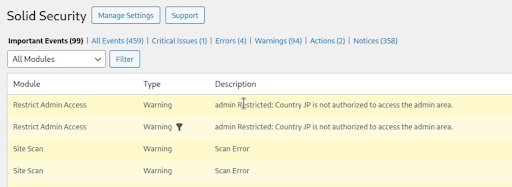
Every denied login attempt is logged in the Solid Security dashboard, so you know exactly when and where someone tried to gain access.
How to Enable Restrict Admin Access by Country
Once you’re running Solid Security Pro, setting up country-based login restrictions only takes a minute. Here’s how to get started:
Go to Settings > Features in your WordPress dashboard. You’ll now see a new option labeled Restrict Admin Access by Country.
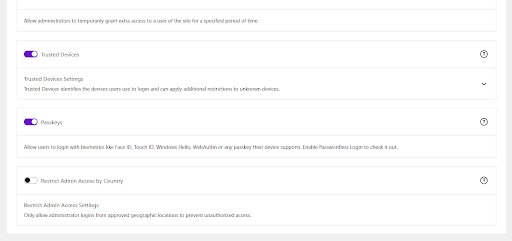
Toggle the feature on, then expand the section to configure the setting. Use the Authorized Administrator Countries field to select which countries should be allowed to access the admin dashboard. Only login attempts from these locations will be permitted—unless the user’s IP is listed under Authorized IPs.
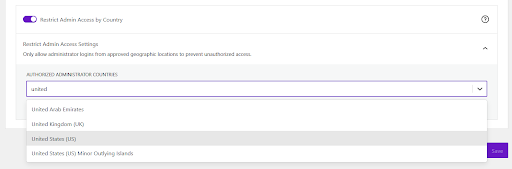
Solid Security Pro includes built-in safeguards to prevent accidental lockouts:
- You’ll see a warning if you try to save a country list that doesn’t include your current location.
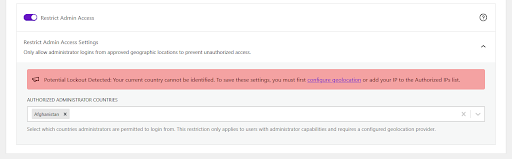
- You’ll also be warned if you remove your own IP address and your country isn’t on the approved list.

If a login attempt comes from a country that isn’t on the list and isn’t an Authorized IP, the request will be denied and a generic Access Denied message will be shown.
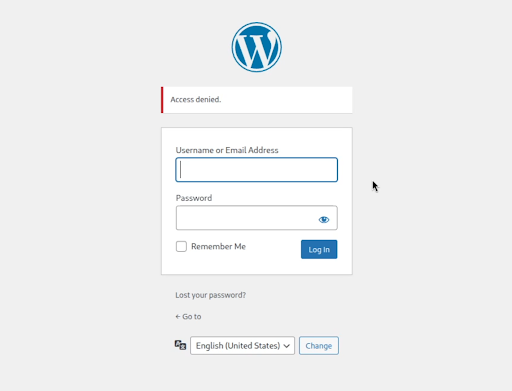
Every blocked attempt is logged as a Warning-level entry in your Security logs, so you always have visibility into what’s happening.
For a complete walkthrough, check out the Restrict Admin Access by Country documentation.
Benefits of Restricting Admin Access by Country
- Hardens login access with geographic controls
- Reduces the impact of credential theft
- Works quietly in the background
- Offers flexibility with authorized IPs and smart safeguards
By restricting access to known countries, you reduce the attack surface dramatically without complicating your workflow.
Peace of Mind, Built In
This isn’t about fear. It’s about prevention. Restrict Admin Access by Country is a straightforward, set-it-and-forget-it defense mechanism. It works in the background, quietly increasing your site’s resilience.
This feature is now available in Solid Security Pro.
Using Solid Security Free? This is a great time to upgrade for professional-grade protection.
Already a Pro customer? Turn on Restrict Admin Access by Country today and take control of your login perimeter.
Join us for the next Solid Academy Webinar!
Free weekly webinars that will help you master WordPress and increase your business's bottom line.
What is a WordPress Phishing Attack?
Learn how to identify and prevent phishing attacks on WordPress websites.
Kiki SheldonWebsite Protection: 5 Ways to Keep Your Website Safe
Robust website protection is the shield that stands between your business and relentless cyber attacks. Prioritizing website protection enables businesses to fortify defenses to safeguard their online presence and preserve the trust of their customers in the face of ever-evolving cybersecurity threats.
Kiki Sheldon23 Ideas To Grow Your WordPress Business in 2023
WordPress is the most popular website-building platform worldwide, trusted by numerous brands. WordPress enables you to build a user-friendly and highly reliable site, together with tools and plugins to enhance your marketing and work like a lead magnet. All these features make WordPress the platform chosen by more than 43% of businesses globally.
SolidWP Editorial TeamSign up now — Get SolidWP updates and valuable content straight to your inbox
Sign up
Get started with confidence — risk free, guaranteed



