


Email deliverability made SOLID. Connect to your chosen email provider with an intuitive set-it-and-forget-it SMTP plugin. Solid Mail 2.1.0 features expanded Email Service Provider connections, time-saving bulk actions, and improved messaging so you know exactly what’s going on with your WordPress email deliverability.
New Features
Connect to one of the most reliable Email Service Providers – Postmark – a NEW feature in Solid Mail 2.1.0. Solid Mail makes connecting to many popular SMTP services straightforward and clear. And now, you can connect to Postmark in addition to Sendgrid, MailGun, Brevo, and Amazon SES. (You can manually connect to any other ESP as well).
Why Postmark?
The team at Solid Mail does not endorse or prefer one Email Service Provider over another. But the choice to add Postmark was an important one. Postmark is in the Top 10 Email Service Providers and has a 91% customer success rating. Like Solid Mail, it features quick and easy setup, offers a variety of plans, and is GDPR compliant.
Adding Postmark to our existing Email Services Providers (SendGrid, Mailgun, Brevo, and Amazon SES) is part of the Solid Mail team’s vision of providing users with the most reliable and easy-to-use WordPress email plugin possible.
Enhancements
Connecting to Email Service Providers
- A significant improvement to initial site connection messaging is included in Solid Mail 2.1.0. When adding a connection, and there are no other connections currently enable, it is not clear that the connection needs to be enabled. With Solid Mail 2.1.0, this initial connection is automatically enabled, saving time for the user and helping to prevent email deliverability problems as a result of unclear communication during setup.
- Confirmation messaging when a connection has been added and saved to ensure that the user knows a connection was added successfully.
- Clear indication when a connection is saved so you know it was added successfully.
Email Deliverability
- “No Logs Found” will display when the site has not sent any email. Prior to Solid Mail 2.1.0 a “Logs will display shortly” message displayed, causing confusion for users who had not yet sent any emails.
- Solid Mail 2.1.0 fixes an anomaly with email logging for WordPress sites using multisite configuration. Emails are being sent, but the email logs were not displaying deliverability details. This has been fixed.
Managing Deleted Emails
- Users can delete email logs in bulk by selecting multiple email logs or “Delete All.”
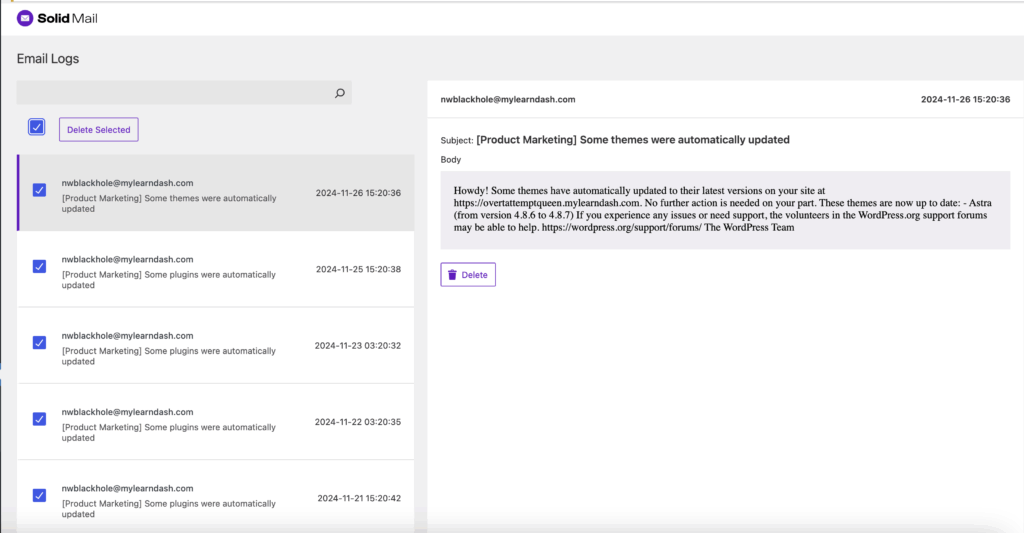
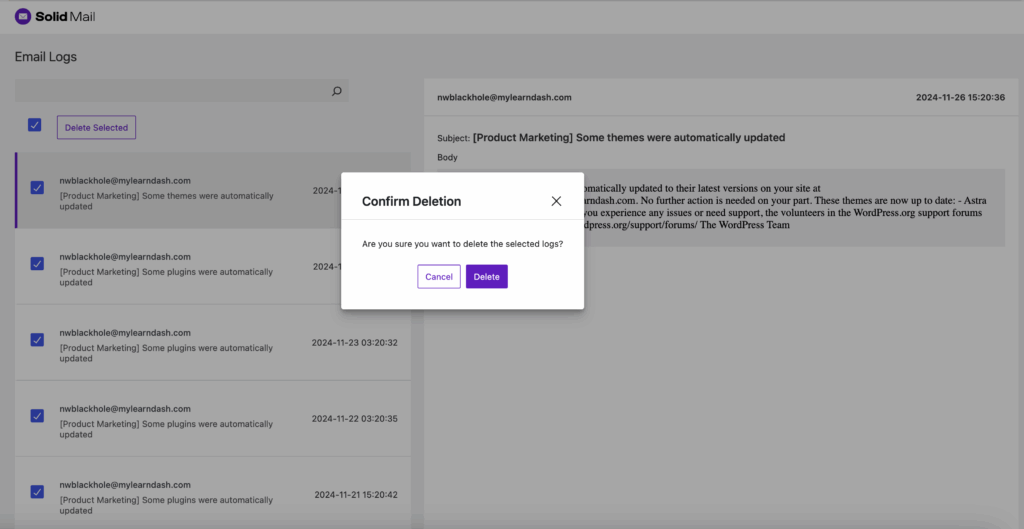
- Users are presented with a confirmation message before deleting an email in the logs to prevent inadvertent email log deletions. (Are you sure you want to delete the selected logs?)
UI Improvements
- The search function on the Email Logs page has been improved. In Solid Mail 1.2.7 the Search Bar “magnifying glass” disappeared and turned into an arrow, causing confusion on how to execute a search. This has been improved by allowing the user to initiate a search simply by selecting “Enter.”
Get Solid Mail
Solid Mail is known as the easy-to-use, set-it-and-forget-it SMTP Plugin for WordPress. With Solid Mail, you can ensure that all your emails reach their destination. Get it now.
Join us for the next Solid Academy Webinar!
Free weekly webinars that will help you master WordPress and increase your business's bottom line.
What is a WordPress Phishing Attack?
Learn how to identify and prevent phishing attacks on WordPress websites.
Kiki SheldonWebsite Protection: 5 Ways to Keep Your Website Safe
Robust website protection is the shield that stands between your business and relentless cyber attacks. Prioritizing website protection enables businesses to fortify defenses to safeguard their online presence and preserve the trust of their customers in the face of ever-evolving cybersecurity threats.
Kiki Sheldon23 Ideas To Grow Your WordPress Business in 2023
WordPress is the most popular website-building platform worldwide, trusted by numerous brands. WordPress enables you to build a user-friendly and highly reliable site, together with tools and plugins to enhance your marketing and work like a lead magnet. All these features make WordPress the platform chosen by more than 43% of businesses globally.
SolidWP Editorial TeamSign up now — Get SolidWP updates and valuable content straight to your inbox
Sign up
Get started with confidence — risk free, guaranteed




