

Sucuri vs Wordfence: Evaluating the Best WordPress Security Plugin
Every website owner knows how important it is to maintain a safe and reliable online presence. Cyber threats such as malware, brute force attacks, and unauthorized access can lead to data breaches, SEO penalties, financial losses, and a lack of consumer trust. To combat these threats, adopting a security plugin like Wordfence or Sucuri is a must.

Every website owner knows how important it is to maintain a safe and reliable online presence. Cyber threats such as malware, brute force attacks, and unauthorized access can lead to data breaches, SEO penalties, financial losses, and a lack of consumer trust.
To combat these threats, adopting a security plugin like Wordfence or Sucuri is a must. Wordfence, a popular PHP-based, on-site security plugin, has an extensive user base within the WordPress community. Sucuri, on the other hand, is a renowned cloud-based security platform, known for its strong customer support and effective malware removal.
With similar feature sets but different methods of arrival, both plugins have their pros, cons, and use cases. Here we’ll provide a detailed comparison of Wordfence and Sucuri based on core features, performance, ease of use, and pricing. We’ll also introduce a third option that offers even more superior features than Wordfence and Sucuri, for the ultimate solution in WordPress security.
Core features of Sucuri and Wordfence
When browsing the wealth of core features available, reflect on your brand’s unique requirements, considering which tool best matches your business needs and budget.
Comparing malware scanning and firewall protection
To clear up any confusion, malware — short for malicious software — is a program or file designed to harm a computer system. In contrast, firewalls monitor and control traffic based on predetermined rules, and so reduce the likelihood of malware sneaking through. Let’s see how Sucuri and Wordfence handle malware scanning and firewall protection.
Sucuri

Sucuri’s latest updates have enhanced malware detection capabilities. The plugin utilizes a cloud-based Web Application Firewall (WAF) that blocks malicious traffic before it even reaches a site. Furthermore, Sucuri’s file integrity monitoring system detects any changes made to website files, so no unauthorized modifications go unnoticed.
A security audit tool identifies vulnerabilities and provides recommendations for improvement, while detailed reports of scan results enable users to take corrective actions. Real-time traffic monitoring and alerts for suspicious activity round out Sucuri’s impressive feature set, and the software integrates with popular WordPress plugins to ensure compatibility.
Wordfence

In comparison, Wordfence offers real-time traffic analysis and machine learning for threat intelligence. The plugin’s endpoint customizable firewall includes IP blocking, rate limiting, and country blocking. A malware scanner provides detailed security reports and alerts, and can repair corrupted files by comparing them to the original WordPress repository versions.
One of Wordfence’s main features is its threat defense feed, which updates in realtime to protect against the latest malware. Like Sucuri, Wordfence also offers traffic monitoring and alerts for suspicious activity.
Verdict
While both Sucuri and Wordfence offer strong malware scanning and firewall protection, the choice ultimately comes down to preference for an endpoint firewall (Wordfence) or a cloud-based one (Sucuri). It’s also worth noting that Wordfence’s firewall runs directly on the server it’s protecting, making it impossible to bypass over the internet, potentially offering greater security. We should also mention that malware scanning is not a preventive strategy. Learn more about Why WordPress Malware Scanners are Worthless.
However, it’s important to recognize that no matter how advanced a malware scanner may be, the process is fundamentally flawed when it comes to modern security. The best plugins on the market are designed to prevent malware application in the first place, as opposed to scanning for its presence and handling it in a reactive way.
Effectiveness in blocking brute force attacks

In a typical brute force attack, automated scripts repeatedly attempt to guess login credentials by trying different combinations of usernames and passwords. How do Sucuri and Wordfence stack up in preventing these attacks?
Sucuri
Sucuri takes a proactive approach to brute force attack prevention through IP blacklisting and rate limiting. The plugin’s global Content Delivery Network (CDN) and WAF combat brute force attacks by filtering traffic before it even reaches the site. Sucuri also offers additional features such as login attempt monitoring and alerts, keeping site owners informed of any suspicious activity.
Wordfence
Wordfence’s brute force protection includes IP blocking, login attempt limits, and CAPTCHA verification. The plugin monitors login attempts in real time to identify and block malicious actors. Wordfence also provides extra features for brute force protection, such as customizable login security settings and Two-Factor Authentication (2FA), adding an extra layer of security to the login process.
Verdict
Both Sucuri and Wordfence offer effective protection against brute force attacks, but they use different approaches. Sucuri’s cloud-based approach has a slight edge in blocking brute force attacks, given its ability to filter traffic before it reaches your site.
Performance impact on site speed
Website owners are understandably concerned about potential slowdowns caused by security plugins. Site speed is a major SEO factor, and slow-loading pages can negatively impact conversions. Research shows that 70% of users admit that page speed impacts their willingness to buy from an online store, so how do our two featured plugins handle the pressure?
Sucuri
Sucuri’s cloud-based WAF reduces server load and improves site performance. By offloading security tasks to a cloud infrastructure, any impact on site speed is minimal. Additionally, Sucuri’s efficient caching mechanism further reduces server load, contributing to faster page times.
Wordfence
In contrast, Wordfence’s local firewall and malware scanning can increase server load, potentially impacting site speed. The plugin’s real-time traffic analysis may also result in higher resource usage. As Wordfence relies more on server-side processing, it can lead to slower page loads, particularly on high-traffic websites.
Verdict
While the differences in performance impact between Sucuri and Wordfence are relatively small, they can be significant if traffic volumes are high. Sucuri’s cloud-based approach offers a slightly faster performance than Wordfence’s server-side processing.
Ease of use and user experience
Ease of use is an important consideration for any security plugin. An ideal solution is one that works in the background, allowing you to focus on your business without constantly worrying about data breaches.
Sucuri
Sucuri offers an automated setup process for basic security configurations, making it easy for users to get started. The dashboard provides easy access to security settings and reports, allowing users to quickly find their website’s security status. Sucuri also offers comprehensive documentation and support resources to assist users when needed, and has a host of useful reviews on Trustpilot:
“Sucuri helped harden my website’s protection by setting up their firewall and scanner, and even managed to speed up my site with their efficient CDN.”
Laurens Mertens, Sucuri User
Wordfence
Wordfence has a user-friendly interface with detailed security reports and alerts. The plugin provides extensive documentation and has an active community for support. Wordfence also features a step-by-step wizard for initial setup, guiding users through the process. The brand’s Trustpilot rating includes the following review:
“Wordfence is clear, flexible, transparent, and communicative. I see what their system is doing, and I can control at a granular level. All the while, WordFence is operating in the background to deal with problems I had no idea about.”
Joe, Wordfence user
Verdict
While both plugins offer user-friendly features, Wordfence is generally considered more beginner-friendly. Its interface and guided setup make it easier for users without technical expertise to manage their website’s security effectively.
Pricing and value for money
While both Sucuri and Wordfence offer free and premium versions of their security plugins, the features and pricing vary significantly between the two:
Sucuri
Sucuri’s free basic plan includes limited features such as malware scanning and removal. Paid plans are as follows:
- Basic Plan: $199.99/year, which includes a WAF and performance optimization.
- Pro Plan: $299.99/year, adds advanced features and priority support.
- Business Plan: $499.99/year offers comprehensive security features for larger sites.
Sucuri also provides a Junior Dev plan at $9.99/year for freelancers and agencies with 2–5 sites. And for those with multiple sites or custom needs, Sucuri offers tailored plans with prices available upon request.
Wordfence
Wordfence also provides a free version with essential security features, including malware scanning and a firewall. Paid plans are as follows:
- Premium Plan: $119/year for a single site and includes real-time threat defense, IP blocking, and 2FA.
- Wordfence Care: $490/year includes support from a dedicated security analyst and installation services from the Wordfence team.
- Wordfence Response: $950/year, adds 24/7 response coverage with a 1-hour response time guarantee.
Verdict
While Sucuri’s plans tend to be more expensive, they offer a wider range of features and support options. Wordfence’s plans are more affordable, particularly for single sites, but may not include the same level of hands-on support and custom solutions as Sucuri. Ultimately, the decision depends on the size of your website, the level of security required, and your available security budget.
Introducing Solid Security: a competitive alternative

While Sucuri and Wordfence are well-known players in the WordPress security space, Solid Security is a comprehensive alternative. With a vast selection of security features, a longstanding market presence, and a trusted reputation since 2008, let’s take a look at how Solid Security measures up.
Key features and benefits
- Custom user login security: Solid Security takes a proactive approach to user login security, offering features like 2FA, passkeys, and strong password enforcement. This ensures that only authorized users can access your site, minimizing the risk of unauthorized access.

- Brute force protection: The platform blocks malicious login attempts by locking out bad actors, providing real-time monitoring, and enforcing strong passwords.
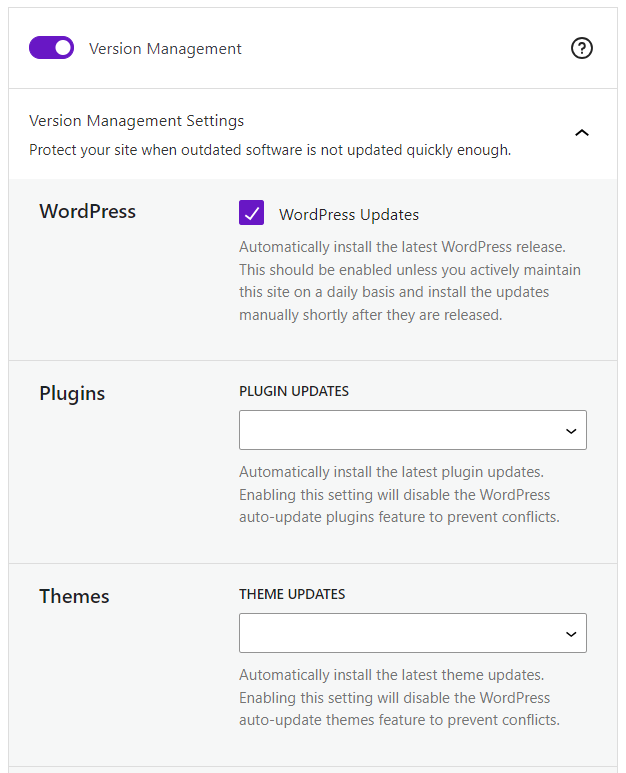
- Automatic plugin updates: A major feature of Solid Security is its automatic updates for plugins and themes. By ensuring that vulnerable plugins are promptly updated, there’s no need to set personal reminders and work on manual updates.
- Patchstack integration: Solid Security also integrates with Patchstack, a leading provider of proactive security measures. Those on our Pro plans gain automatic patching of vulnerabilities, giving you peace of mind that your site is protected against the latest threats.

- Real-time security dashboard: The real-time security dashboard provides an in-depth overview of your site’s security status and alerts you to any issues that require attention. It’s easy to stay on top of your site’s security and only take action when needed.
- Ease of use: Solid Security prioritizes ease of use, with a user-friendly interface and a straightforward setup process. Even non-technical users can quickly get up and running with our plugin.
Performance and reliability
Solid Security is designed to provide excellent security without significantly affecting site speed and performance. You can rest assured that your site will remain fast and responsive, as our users will testify, awarding us a 4.6 star rating on Trustpilot:
“The team is always friendly, extremely helpful, and goes above and beyond to resolve any issues I encounter. Whether it’s a minor tweak or a more complex problem, they handle everything with professionalism and a smile. SolidWP’s support team truly sets them apart in the industry. Highly recommended!”
Paul Taubman, Solid Security user
A premium feature set, strong performance, and exceptional customer support place Solid Security as the compelling alternative to Sucuri and Wordfence.
Value for money
A free version includes essential features like vulnerability scanning, a firewall, and limiting login attempts to protect against brute force attacks. You’ll also gain additional login features like 2FA, and strong password enforcement. Paid Pro plans include file integrity monitoring, passkeys for logins, and the virtual patching of vulnerabilities via Patchstack:
- $99/year for a single site
- $199 for 5 sites
- $299 for 10
- $399 for 25
- $499 for 50
Why choose Solid Security over Sucuri and Wordfence?
- Comprehensive security: Solid Security is an all-in-one WordPress security solution. Furthermore, the wider Solid Suite also includes Solid Backups and Solid Central, offering users consummate backup and restoration options, plus single dashboard multi-site management. Solid Suite subscribers also gain free access to the Solid Academy, which offers a wealth of WordPress guides, tutorials, and courses.
- User-friendly: Our plugin is user-friendly, with an easy setup process, making it an ideal choice for beginners and advanced users alike.
- Proactive protection: Solid Security also excels in proactive protection, thanks to features like Patchstack integration and automatic updates. These measures help to address vulnerabilities before they can be exploited, setting the platform apart from competitors that rely on more reactive measures.
“Solid Security Pro’s integration with Patchstack is a breakthrough in WordPress security. By automating vulnerability scanning and virtually patching vulnerabilities before updates are available, it reduces the risk of a successful attack to nearly zero, providing an unprecedented level of proactive protection.”
Joel Liriano, Director of Quality Assurance, StellarWP
- Cost-effective: Solid Security provides better value for money compared to Sucuri and Wordfence, especially for those managing multiple sites.
Feature comparison: Sucuri, Wordfence, and Solid Security
| Feature | Sucuri | Wordfence | Solid Security |
| Malware Scanning | Server-side scanning, but can miss some malware. | Scans WordPress core, plugins, themes, but scanner may slow some sites. | Scans plugins, themes, core, Google Safe Browsing, and passwords. |
| Firewall | Cloud-based WAF that blocks threats before reaching site. | Endpoint firewall that runs on the server, real-time protection. | Firewall works well out of the box, ability to add custom rules. Patchstack’s virtual patching adds further strength by patching vulnerabilities whenever found. |
| Brute Force Protection | Login attempt monitoring and alerts. | Blocks attacks by locking out bad actors, real-time monitoring. | Protects against local and network brute force attacks, allows users to create their own blacklists, limit login attempts, and ban specific IP addresses. |
| Site Speed Impact | Minimal due to cloud-based processing. | Can impact server resources and slow down sites. | Designed for minimal performance impact. |
| Ease of Use | Easy to use but lots of options can be overwhelming for some users. | User-friendly interface but many settings may require technical knowledge. | Intuitive interface, guided setup, suitable for beginners and tech experts alike. |
| Pricing | Starts at $199.99/year, no price scaling. | Starts at $119/year for premium, some bulk discounts available. | Starts at $99/year for one site, significant savings for multiple sites compared to Sucuri and Wordfence. Free version includes more in-depth security features than other gratis products. |
Why Solid Security is the ultimate WordPress security solution
In summary, Sucuri and Wordfence are two well-established security plugins for WordPress. Sucuri is known for its cloud-based firewall and malware scanning capabilities, making it a popular choice for larger enterprises. In contrast, Wordfence is easier to use right out of the box, thanks to its user-friendly interface and onboarding wizard, making it a great option for beginners.
However, for those seeking the ultimate in website security, Solid Security provides a superior solution. With its comprehensive range of features and user-friendly design, Solid Security is easy for anyone to use, regardless of technical expertise.
Integration with Patchstack places Solid Security on a different level, with scanning and virtual patches fixing potential problems at the gate. Add further features like custom user login security, brute force protection, and a real-time dashboard and you’ll see why Solid Security provides the complete package for site protection.
For the ultimate peace of mind when it comes to your website, get started with Solid Security today!
Join us for the next Solid Academy Webinar!
Free weekly webinars that will help you master WordPress and increase your business's bottom line.
What is a WordPress Phishing Attack?
Learn how to identify and prevent phishing attacks on WordPress websites.
Kiki SheldonWebsite Protection: 5 Ways to Keep Your Website Safe
Robust website protection is the shield that stands between your business and relentless cyber attacks. Prioritizing website protection enables businesses to fortify defenses to safeguard their online presence and preserve the trust of their customers in the face of ever-evolving cybersecurity threats.
Kiki Sheldon23 Ideas To Grow Your WordPress Business in 2023
WordPress is the most popular website-building platform worldwide, trusted by numerous brands. WordPress enables you to build a user-friendly and highly reliable site, together with tools and plugins to enhance your marketing and work like a lead magnet. All these features make WordPress the platform chosen by more than 43% of businesses globally.
SolidWP Editorial TeamSign up now — Get SolidWP updates and valuable content straight to your inbox
Sign up
Get started with confidence — risk free, guaranteed




