

Complete Guide to xmlrpc.php (And How to Disable It)
Anyone managing a WordPress site will likely have come across the XML-RPC function at some point. This API allows users to interact with their WordPress sites using external applications, offering a convenient way to manage content remotely. XML-RPC and its xmlrpc.php file have largely been replaced by newer, more secure APIs like REST and GraphQL.

Anyone managing a WordPress site will likely have come across the XML-RPC function at some point. This API allows users to interact with their WordPress sites using external applications, offering a convenient way to manage content remotely.
XML-RPC and its xmlrpc.php file have largely been replaced by newer, more secure APIs like REST and GraphQL. Despite this, XML-RPC remains in use for certain themes, the WordPress mobile app, and plugins like Jetpack.
Unfortunately, the xmlrpc.php file — which handles XML-RPC functionality — is vulnerable to various security risks like brute force and DDoS attacks. Disabling XML-RPC boosts WordPress site security and protects against threats. In this article, we’ll explore the benefits of disabling XML-RPC and provide step-by-step guidance on how to achieve this using code or a dedicated security plugin.
What is xmlrpc.php in WordPress?
The xmlrpc.php file enables external applications to interact with WordPress, originally designed for remote publishing to allow users to manage sites without direct dashboard access. This was particularly useful for bloggers and developers using third-party tools or mobile devices.
Introduced in WordPress’s early days, XML-RPC facilitated communication using standardized calls. As web technologies advanced, it became less popular, largely replaced by more secure options like the REST API. However, xmlrpc.php remains for legacy support, allowing older plugins and themes to function.
How xmlrpc.php works
The XML-RPC protocol transfers data between external applications and WordPress by encoding commands in XML and sending them over HTTP. The xmlrpc.php file acts as a gateway for external requests, enabling remote publishing, mobile app access, and services like Jetpack without direct dashboard access.
As the entry point for XML-RPC requests, xmlrpc.php allows external systems to perform tasks like publishing posts and interacting with plugins or themes. While REST now handles most functions, XML-RPC remains for backward compatibility.
Common uses of xmlrpc.php
Remote Publishing
One of the primary uses of xmlrpc.php was to allow users to publish content remotely. This was particularly helpful for bloggers and developers who needed to create or edit posts without accessing the WordPress admin dashboard directly. External applications could use XML-RPC to interact with the site and handle tasks like creating posts, managing categories, or uploading media.
Mobile App Integration
The WordPress mobile app also relies on xmlrpc.php for communication between the app and a WordPress site. XML-RPC enables the app to connect and sync with the site, making it possible for users to update their content, manage comments, and perform administrative tasks on the go.
Pingbacks and Trackbacks
XML-RPC plays a role in facilitating pingbacks and trackbacks between WordPress sites. These features allow WordPress to communicate with other websites, notifying them when their content has been linked to or referenced in a blog post. Pingbacks and trackbacks use XML-RPC to send these notifications, ensuring that links between websites are recorded and acknowledged.
Security risks and vulnerabilities
Brute Force Attacks
Brute force attacks are one of the most common threats faced by WordPress sites. These automated attacks attempt to guess login credentials by trying multiple combinations of usernames and passwords until they find a match. Given the number of weak and reused passwords out there, brute force attacks can be a highly effective method for gaining unauthorized access.
Attackers often target the XML-RPC gateway to launch brute force attacks. Methods like system.multicall allow hackers to send hundreds or thousands of authentication attempts simultaneously. This increases the likelihood of successfully breaking into a site. Disabling XML-RPC reduces this risk significantly by limiting the attack surface available to hackers, making it more difficult for them to automate login attempts and steal credentials.
DDoS Vulnerabilities
Distributed Denial of Service (DDoS) attacks are another threat that can be partially tamed by disabling XML-RPC. In a DDoS attack, multiple compromised systems flood a target website with traffic, overwhelming the server and disrupting its functionality. This results in the site being inaccessible to legitimate users, leading to loss of revenue and damage to reputation.
One way attackers exploit XML-RPC in DDoS attacks is through the WordPress pingback feature. Hackers can use pingbacks in conjunction with xmlrpc.php to send a large number of requests at once, overloading the server and potentially taking the site offline. Disabling XML-RPC is an effective step in preventing this type of exploitation.
Other Security Concerns (e.g., XSPA)
Apart from brute force and DDoS attacks, xmlrpc.php poses other security risks, such as cross-site request forgery (XSPA) and remote code execution (RCE). These vulnerabilities can expose your website to unauthorized actions, allowing attackers to perform operations on your server without your consent. Disabling XML-RPC helps mitigate these risks, providing additional layers of protection for your site.
Why Should you disable xmlrpc.php?
XML-RPC is outdated compared to modern solutions like the REST API and is largely replaced by more secure protocols. Keeping it enabled introduces risks, as most tools no longer need it.
Disabling xmlrpc.php improves security by removing a major attack entry point, often exploited for brute force and DDoS attacks. It reduces the attack surface, mitigating unauthorized access and server overloads.
Additionally, keeping XML-RPC enabled can harm site performance by allowing unnecessary requests that slow or even crash your server. Disabling it improves performance and reduces server strain.
How to Check if xmlrpc.php is Enabled on Your Site
- Visit the XML-RPC Validator website.

- Enter your site’s domain name in the provided field.
- Click on the Check button.
- If you see a success message, XML-RPC is enabled on your WordPress site.
If XML-RPC is enabled, don’t worry. Check the source code of your plugins and themes to see if any of your apps are using the function. This can be done via an sFTP client or through your hosting provider’s control panel, like cPanel:

Users should access Files > File Manager, then search through the source code of /wp-content/plugins and /wp-content/themes for references to xmlrpc.php.
Alternatively, you can input the following code to confirm if any apps are running XML-RPC:
add_filter('xmlrpc_enabled','__return_true');If its use is deemed essential, site owners can opt for alternative security measures instead, as we’ll detail later on in this article.
Methods to disable xmlrpc.php in WordPress
1. Using security plugins (featuring Solid Security)
The safest and easiest method of disabling XML-RPC is through the use of a dedicated security plugin like Solid Security.
Once you’ve installed our plugin, you can disable XML-RPC by following these simple steps:
- Go to Security > Settings > Advanced in the WordPress dashboard.
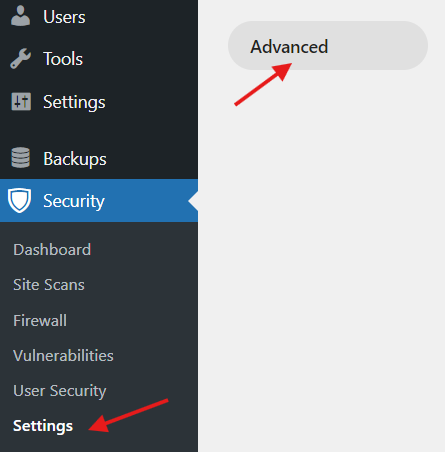
- Navigate to the WordPress Tweaks section.

- Find the XML-RPC settings next to API Access.

- Select Disable XML-RPC to completely disable the function.
- Save changes.
It’s important to note that disabling XML-RPC may cause compatibility conflicts with certain plugins or services that rely on this feature. If you encounter any problems after disabling XML-RPC, Solid Security’s support team is available to assist you in resolving any issues and ensure your site remains secure and functional.
2. Manually Disabling xmlrpc.php
Depending on your coding skills, you can disable the XML-RPC function in WordPress by altering the .htaccess file. .htaccess is a configuration file that controls various server settings for a WordPress site, such as permalinks, redirects, and security features. It’s located in the root directory of your installation.
Before editing the .htaccess file, back it up to easily restore the original in case of issues.
To disable xmlrpc.php using the .htaccess file, follow these step-by-step instructions:
- Access the .htaccess file in the root directory of your WordPress installation via sFTP or your hosting provider’s File Manager.
- Open the .htaccess file in a text editor.
- Add the following code snippet to the file:
<Files xmlrpc.php>
Order Allow,Deny
Deny from all
</Files>- If using the Apache server, version 2.4 or later, input the following code instead:
<Files "xmlrpc.php">

Require all denied

</Files>- Save the changes and upload the modified .htaccess file back to the server, overwriting the original file.
- Verify the changes by using the XML-RPC validator. The xmlrpc.php file should now be inaccessible.
Alternatives to xmlrpc.php
A more secure and scalable alternative to XML-RPC is the WordPress REST API, which uses JSON instead of XML for communication. The REST API simplifies remote site management for tasks like content creation, updates, and user management, offering better performance and security.
Other alternatives include the GraphQL API, which efficiently fetches specific data, reducing server load and improving performance. REST and GraphQL offer more control and fewer vulnerabilities, making them ideal replacements for XML-RPC.
Take action: Implement comprehensive XML-RPC security today
“XML-RPC is an outdated protocol that exposes WordPress sites to security risks. By shutting down this potential gateway, you can protect your site against brute force attacks, DDoS vulnerabilities, and other threats that can compromise your site data and user information. Unless you have plugins that require XML-RPC, it’s best to disable it to harden your site against potential threats.”
— David G Johnson, Product Owner, SolidWP
So now you know why disabling xmlrpc.php is essential for WordPress security! Leaving xmlrpc.php enabled puts your site at risk, making it an easy target for hackers and malicious actors to exploit.
However, disabling XML-RPC is just one piece of the puzzle. To truly secure your site, you’ll need a solution like Solid Security. Our plugin goes beyond disabling xmlrpc.php, protecting against various cyber threats like brute force and DDoS attacks with features like two-factor authentication and real-time monitoring.
Don’t wait until it’s too late — take immediate action to strengthen your site by installing Solid Security today.
Join us for the next Solid Academy Webinar!
Free weekly webinars that will help you master WordPress and increase your business's bottom line.
What is a WordPress Phishing Attack?
Learn how to identify and prevent phishing attacks on WordPress websites.
Kiki SheldonWebsite Protection: 5 Ways to Keep Your Website Safe
Robust website protection is the shield that stands between your business and relentless cyber attacks. Prioritizing website protection enables businesses to fortify defenses to safeguard their online presence and preserve the trust of their customers in the face of ever-evolving cybersecurity threats.
Kiki Sheldon23 Ideas To Grow Your WordPress Business in 2023
WordPress is the most popular website-building platform worldwide, trusted by numerous brands. WordPress enables you to build a user-friendly and highly reliable site, together with tools and plugins to enhance your marketing and work like a lead magnet. All these features make WordPress the platform chosen by more than 43% of businesses globally.
SolidWP Editorial TeamSign up now — Get SolidWP updates and valuable content straight to your inbox
Sign up
Get started with confidence — risk free, guaranteed




