

In this article, you’ll learn how to use the exclusions feature in the Solid Performance caching plugin for WordPress. This guide will help you understand how to keep certain pages and posts from being cached, ensuring that dynamic or user-specific content is always up-to-date.
Cache Exclusion Overview #
Using the exclusions setting in Solid Performance allows site administrators to prevent certain pages and posts from being cached. This is especially useful for pages that display constantly changing information or user-specific content, which might otherwise show outdated or incorrect data if cached.
Path-based Matches #
With Solid Performance, you can exclude specific paths that match a page or post’s permalink URL. This straightforward approach ensures that the specified URLs are always served fresh without being cached.
Examples #
- /directory/steve matches https://example.com/directory/steve
- /contact-us matches https://example.com/contact-us
To add a path-based exclusion:
- Navigate to Settings > Solid Performance > Advanced
- Locate the Cache Exclusions section.
- Enter the desired path in the provided field
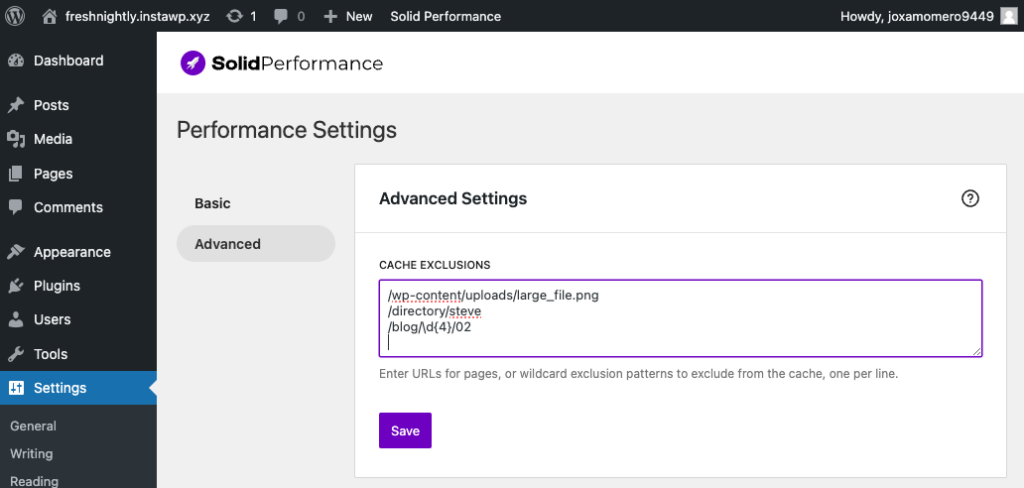
If more than one path is excluded, each path must be on its own line.
Regex-based Matches #
For more fine-tuned control over which pages and posts are excluded from the cache, you can use Regular Expressions (regex). This method allows you to specify patterns for excluding multiple URLs that share similar characteristics.
Examples #
- /directory-[a-z]* would match /directory-steve or /directory-mark
- /blog/\d{4}/02 would match /blog/2024/02 and /blog/2023/02 (posts from the second month of every year)
Key Resources for Regular Expressions #
If you’re new to Regular Expressions or need a refresher, the following resources can help you get started:
To add a regex-based exclusion:
- Navigate to Settings > Solid Performance > Advanced
- Locate the exclusions section.
- Enter the desired path in the provided field
If more than one path is excluded, each path must be on its own line.
By utilizing these exclusion settings, you can ensure that your site’s dynamic content remains accurate and up-to-date, enhancing the user experience and maintaining site performance.
Are any paths automatically excluded? #
Yes! When a site is running WooCommerce or GiveWP, it’s imperative that pages like the cart (for WooCommerce) or the donation history page (for GiveWP) not be cached, as that would risk showing incorrect data to site visitors.
While it’s not actively promoted as a feature, “Smart Exclusions” works behind the scenes to automatically exclude those pages from the cache.
Key points:
- Default exclusions are enabled automatically when specific plugins are active
- Solid Performance monitors your active plugins and adjusts exclusions as needed.
WooCommerce Smart Exclusions #
When WooCommerce is active, Solid Performance automatically excludes certain pages from caching. This maintains the integrity of your e-commerce functionality.
According to WooCommerce’s official documentation, specific pages must be excluded when using a page caching solution. Solid Performance ensures these pages are excluded:
- Cart
- Checkout
- My Account
Excluding these pages ensures customers always see up-to-date information about their orders, cart contents, and account details.
GiveWP Smart Exclusions #
For websites using GiveWP, a popular donation plugin, Solid Performance also handles automatic cache exclusions. These exclusions are based on GiveWP’s troubleshooting tips for page caching.
When GiveWP is active, Solid Performance excludes the following pages from caching:
- /donations
- /donation-confirmation
- /donor-dashboard
These exclusions ensure smooth donation processes, accurate confirmation pages, and real-time donor dashboard access.



