

The performance of your website can significantly impact user experience and search engine rankings. For WordPress site owners, ensuring a swift, seamless browsing experience is crucial. This is where Solid Performance and its one-click page caching comes into play. By understanding and implementing page caching with Solid Performance, you can enhance your WordPress site’s performance effortlessly.
What is Page Caching and How Does It Work in WordPress? #
Page caching is a technique used to store copies of web pages to reduce the time it takes to load a page. When a user visits your WordPress site, the server uses PHP and queries your MySQL database to generate the page as it is seen in a browser. But once the page is generated from the server, it can be turned into static files that load much more quickly. That is what Page caching does– it saves a static version of your web pages on your website, so the server can deliver the stored version without processing new requests each time.
But how does page caching work in WordPress websites? Here’s how it works:
- Advanced-cache.php: When you enable Solid Performance, this file is automatically generated for you. It’s located in /wp-content/advanced-cache.php. This file processes requests before WordPress fully loads, making it a critical component in the caching process.
- Rendering and Saving HTML: When a page is requested for the first time, Solid Performance compiles and renders the HTML, which is then saved to a file in the
wp-content/cache/page/[your-domain-here.com]/directory. - Serving Cached HTML: For subsequent requests, the saved HTML file is sent directly to the client without WordPress needing to reload, compile, or render the page again. This significantly speeds up content delivery.
Types of Caching: #
There are several different aspects of your website that can be cached in different ways. Generally speaking, they all fit into two categories: Browser Caching, and Server-side caching.
Browser Caching: Stores web page resources (like images, CSS, JavaScript) on the user’s device for faster access on subsequent visits.
Server-Side Caching: Stores the generated page on the server, reducing the load time for future visits. Examples include object caching and opcode caching.
Page Caching is what Solid Performance implements for you and is one aspect of Server-Side caching.
Benefits of Page Caching for WordPress Websites #
There are several important benefits for your website and visitors when you leverage page caching with Solid Performance.
Consider a popular blog website that receives thousands of daily visitors. Without caching, each visit requires WordPress to process PHP and MySQL requests to compile and render the page, consuming considerable server resources and time. With page caching, the first visitor triggers the static page generation, but subsequent visitors receive the saved HTML file instantly, improving load times and reducing server strain.
With that in mind, here are some benefits of properly leveraging page caching in your WordPress website:
Improved Website Speed and Load Times: Cached pages load much faster than dynamic ones, enhancing the overall speed of your site.
Enhanced User Experience: Faster load times lead to a better browsing experience, increasing the likelihood of user engagement and retention.
Reduced Server Load and Bandwidth Usage: By serving cached pages, the server handles fewer requests, reducing the load and saving bandwidth.
Better Search Engine Rankings: Search engines favor fast-loading websites, which can improve your site’s ranking in search results.
Cost Savings on Hosting Resources: Efficient caching can reduce the need for high-performance hosting plans, saving money.
How to Implement Page Caching in WordPress with Solid Performance #
The Getting Started Guide walks you through implementing Page Caching in WordPress using Solid Performance. Spoiler alert: it’s pretty quick.
Common Issues and Troubleshooting Tips when using Page Caching on your WordPress Website #
Because you are saving your page as a static page at a specific point in time, it is possible that the javascript or css is saved in a way that makes your page not render exactly right. Fortunately, it is very easy to clear your page cache and have the page re-rendered again.
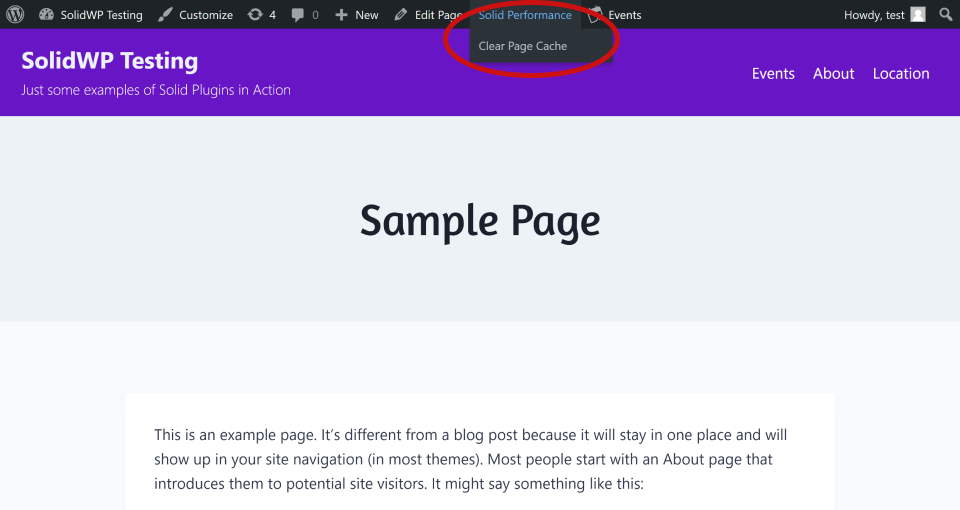
If you notice a page that isn’t rendering exactly right, navigate to that page while logged-in. Next, see the admin bar at the top of the page and hover over the menu item “Solid Performance”. You’ll see a menu item drop down labeled “Clear Page Cache”. Clicking that will clear that one page from your page cache and re-render the page anew.
Conclusion #
Page caching is a highly beneficial aspect of optimizing your WordPress site’s performance. By understanding and implementing Solid Performance on your website, you can enhance your site’s speed, improve user experience, and achieve better search engine rankings. Start leveraging the power of page caching today with Solid Performance.



