
To license the Solid Security Pro plugin, log into your website and go to WordPress Dashboard -> Settings -> SolidWP Licensing.
Under the Unlicensed Products section, tick the Solid Security Pro checkbox and enter your SolidWP username and password. Then, click the “License Products” button.
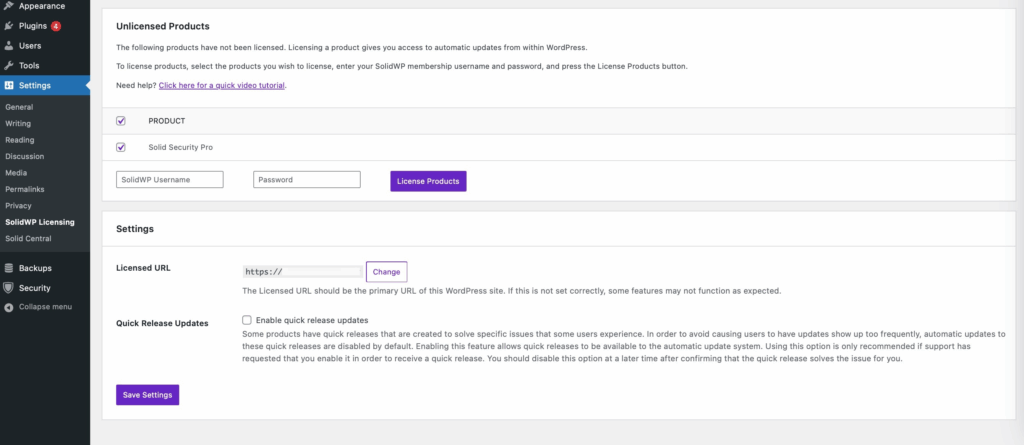
Ensure that the Licensed URL is correct and matches your site. While the vast majority of Solid Security features do not require a license to function on a day-to-day basis, there are some that do interact with the Licensing system to work. Specifically, the Site Scanner runs a brief check to ensure that a site is correctly licensed. If you are running into errors related to the site scanner, the first troubleshooting step is to check to make sure the licensed URL exactly matches the site URL.
Note that the password you need to enter here is the same one you use to log into the Member Panel. If you need to, you can change your password there using the “Forgot password?” link.
Patchstack Licensing #
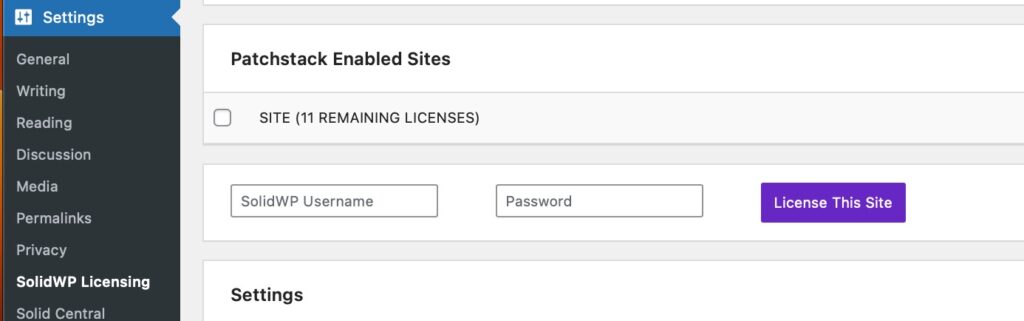
If you’ve purchased a separate Patchstack license and want to enable it, log into the site where the Solid Security Pro plugin is installed and go to the SolidWP Licensing page.
You’ll see a Patchstack Enabled Sites section where you need to enter your SolidWP username and password to activate it.