

Skip to content
  • Pricing
  • Products & Services
      Save 25%

      Solid Suite

      Secure your sites, keep them safely backed up, and grow your business… all while saving time and money.

      • Solid Security
      • Solid Backups
      • Solid Central
      • Solid Academy
      See pricing

      Protect

      Shield your site from cyberattacks and prevent security vulnerabilities

      A cloud-first solution for rocket fast backups and one-click restore.

      Repair

      Hacked website? Let our WordPress security experts clean up malicious code, remove threats and restore your site.

      Manage

      Maximize and amplify your admin with remote multi-site management.

      Ensure delivery of every email sent from your site.

      Free Plugins

  • Resources
      Save 25%

      Solid Suite

      Secure your sites, keep them safely backed up, and grow your business… all while saving time and money.

      • Solid Security
      • Solid Backups
      • Solid Central
      • Solid Academy
      See pricing

      Academy

      Solid Academy

      For anyone who wants to start or grow a business around WordPress.

      Guides

      Dive deeper into our free WordPress and business guides.

      Livestreams

      Free livestreams to help you discover new tools and work more efficiently

      Tutorials Academy

      Learn WordPress with our beginner WordPress tutorials

      Resources

      Blog

      Catch up on the latest news from our WordPress security experts

      Vulnerability Report

      Keep track of every new plugin and theme vulnerability

      Support

      Your success with Security, Backups and Central is our highest priority.

      Documentation

      Learn everything you need to know about our products & services.

Sign In Get Solid Suite
SolidWP Logo Black
  • Pricing
  • Products & Services
    • Solid Security Pro
    • Solid Backups — NextGen
    • Solid Fix
    • Solid Central
    • Free Plugins
    • Solid Security
    • Solid Performance
    • Solid Mail
  • Resources
    • Solid Academy
    • Guides
    • Livestreams
    • Tutorials
    • Blog
    • Vulnerability Report
    • Support
    • Documentation

How It Works

17
  • All About Solid Security’s Tools
  • Using Solid Security’s CAPTCHA
  • All about Firewall with Solid Security
  • Solid Security Two-Factor Authentication (2FA) Settings Guide
  • Releasing Site Lockouts in Solid Security
  • Diagnosis Tips: Raw Details of Site Scanner Logs
  • SolidWP Licensing: How to Make sure your site is licensed correctly
  • All about Solid Security’s Debug Mode
  • Frequently Asked Questions
  • Vulnerability Protection with Solid Security
  • Security Logs
  • All about User Security with Solid Security
  • All about Solid Security Site Scans
  • Solid Security Dashboard
  • What are Passkeys for WordPress Websites?
  • All about the Solid Security Settings
  • Understanding Trusted Devices in Solid Security

Learn More

9
  • Restrict Admin Access by Country Settings Guide
  • Security Headers Settings Guide
  • List of Solid Security Pro Action Hooks
  • How Do I Integrate My Plugin with Solid Security Pro reCAPTCHA?
  • Solid Security Pro WP-CLI Integration
  • All about Solid Security’s Debug Mode
  • Frequently Asked Questions
  • What are Passkeys for WordPress Websites?
  • Understanding Trusted Devices in Solid Security
View Categories
  • Home
  • SolidWP Documentation
  • Solid Security
  • How It Works
  • Diagnosis Tips: Raw Details of Site Scanner Logs

Diagnosis Tips: Raw Details of Site Scanner Logs

1 min read

In the process of diagnosing problems highlighted by the Solid Security Site scanner, you’ll need all the details you can get.

The raw detail option is the fastest way to dial into exactly what’s wrong with your site, to know how to move forward in resolving the issue, and return your site to a worry-free state.

You can obtain raw details of any scan, failed or clean, by navigating to Security -> Logs in your WordPress Admin menu. 

The dropdown menu allows you to display the log entry type you wish to view. The below screenshot shows ALL Events, filtered by Site Scanner module. Only the event types that are present in the list are able to be filtered.
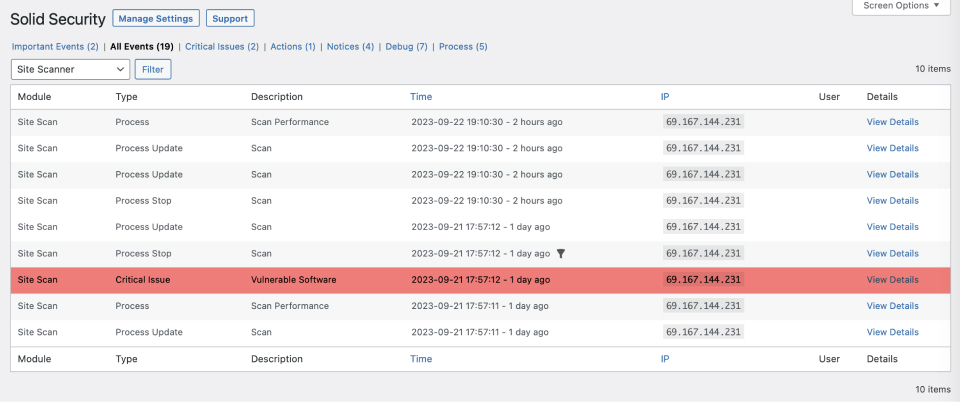
Selecting the View Details link on the scan you want to dig into.

The following screen will show the condensed version of the selected scan’s details. Select Show Raw Details to see the full details of the scan. 

Next, highlight and copy all the information within the section marked Raw Details.

This data is useful for you to dig into the specific issue. Also, if you reach out to the SolidWP support team, this is great information to include in your support request. The team is more than happy to help get to the bottom of the issues with you.


Updated on April 22, 2026

Was this doc helpful?

  • Happy
  • Normal
  • Sad
Releasing Site Lockouts in Solid SecuritySolidWP Licensing: How to Make sure your site is licensed correctly
SolidWP
  • Pricing
  • Products
    • Solid Suite – save 25%
    • Solid Security
    • Solid Backups — NextGen
    • Solid Central Pro
  • Resources
    • Blog
    • Academy
    • Guides
    • Tutorials
    • Vulnerability report
  • Support
    • Documentation
  • My account
  • Contact us
    • Terms
    • Refund policy
    • Privacy policy
    • Change Cookie Preferences
  • About SolidWP
    • FAQ
    • Looking for iThemes?
    • Affiliates
    • Press
  • Our Partner Brands
    • GiveWP
    • Iconic
    • KadenceWP
    • LearnDash
    • MemberDash
    • Orderable
    • The Events Calendar

Get Solid Suite bundled with hosting.

Explore StellarSites
  • X
  • YouTube
  • Facebook

A Liquid Web Brand
Hosting for WordPress
© 2025 All Rights Reserved

StellarWP logo
Liquid Web logo