
Websites without security headers leave their users’ browsers vulnerable to clickjacking, data injection, and account compromise. Without specific instructions, a browser has no way of knowing whether it should block risky behaviors, such as loading unauthorized scripts or allowing your site to be embedded in an iFrame.
How It Works #
Solid Security now provides a simple interface to implement four essential security headers. These settings instruct the browser to enforce strict security policies, effectively mitigating or eliminating common client-side attack vectors.
By configuring these headers, you can control:
- X-Frame-Options: Protection against clickjacking attacks.
- X-Content-Type-Options: Prevention of malicious file execution.
- Referrer-Policy: Limitation of information sharing in referral data.
- Content-Security-Policy: Limitation of where resources can be loaded from.
Configuring Security Headers #
To access these settings, navigate to Settings > Advanced in your WordPress dashboard. Locate the Security Headers setting and toggle it on.
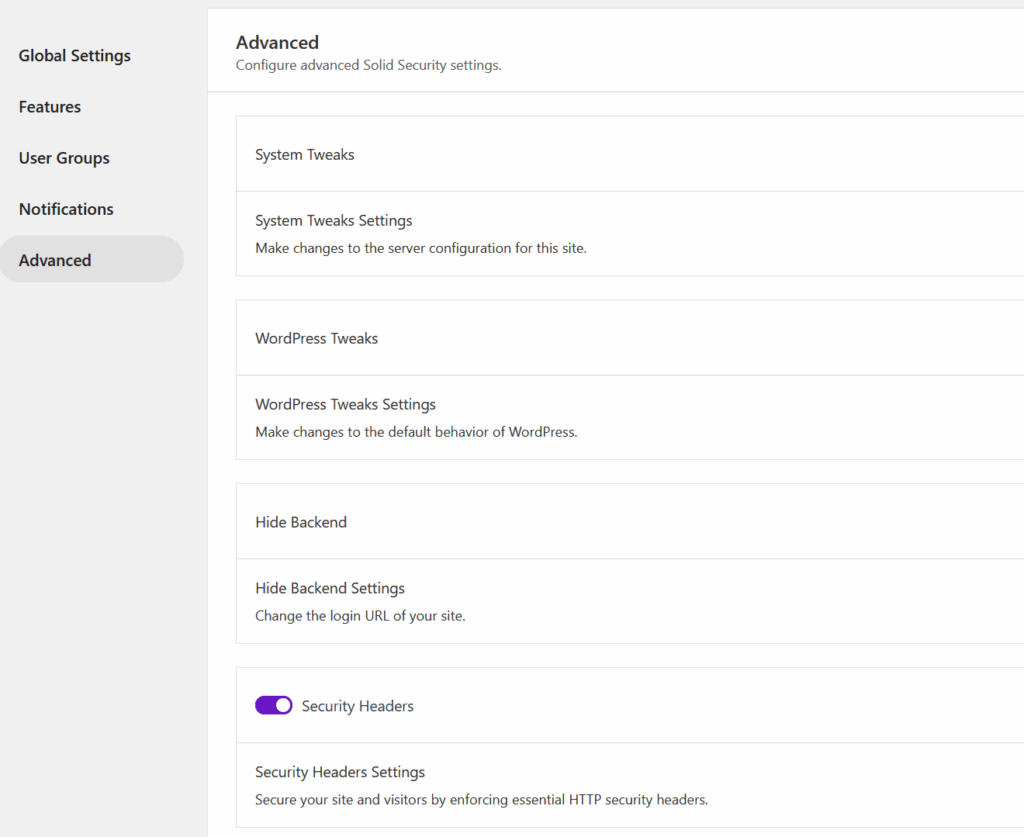
Once enabled, expanding the section will present five new settings to configure.
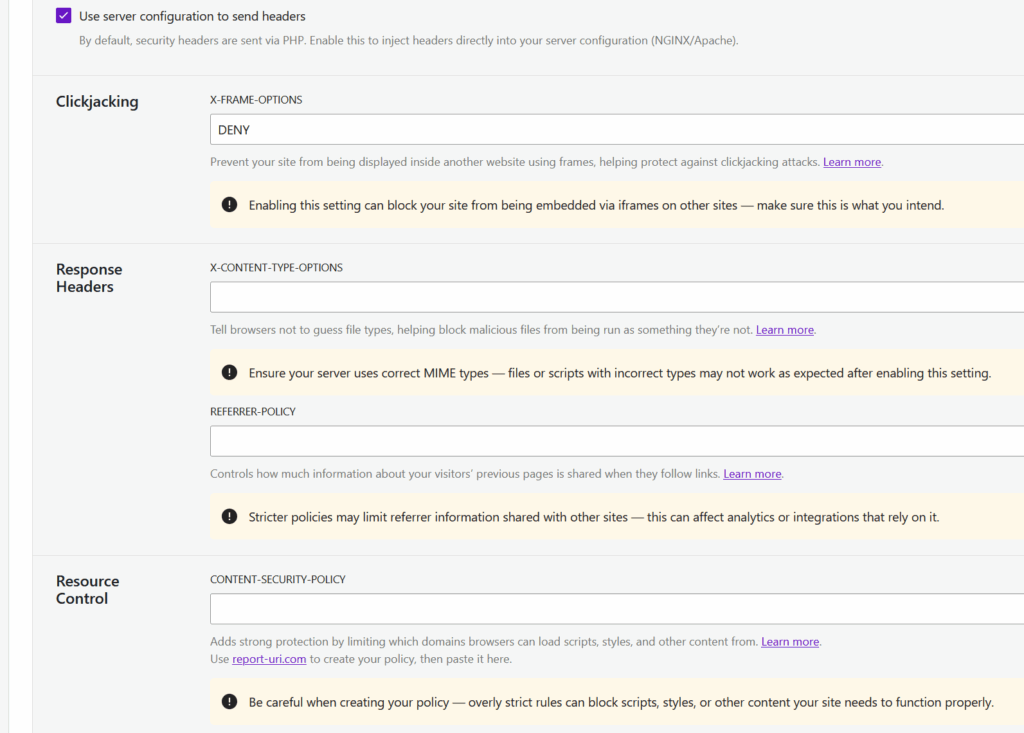
Use server configuration #
By default, Solid Security generates these headers via PHP. We have chosen this method out of an abundance of caution, as it is safer for users who may not fully understand the consequences of modifying server configuration files.
However, you can choose to have these headers handled directly by your web server (NGINX or Apache) for better performance.
If you toggle Use server configuration on:
- Headers will no longer be generated via PHP.
- Solid Security will write the necessary rules to your
.htaccess(Apache) ornginx.conf(NGINX) files.
Note for NGINX Users: If you are using NGINX, you must reload NGINX manually after saving this setting for the changes to take effect. You can verify the changes to your config files by navigating to Settings > Tools > Server Config Rules.
Specific Header Settings #
1. X-Frame-Options #
This setting determines whether your site can be loaded into another website via an iFrame.
- The Goal: Protects against clickjacking attacks. In these attacks, your site is loaded transparently inside a malicious site to trick users into clicking buttons (like “Delete Account”) or entering credentials without realizing it.
- Configuration: You can choose to allow framing from the same origin, specific origins, or deny it entirely.
- More Info: MDN Web Docs: X-Frame-Options
2. X-Content-Type-Options #
This setting prevents the browser from “sniffing” a file to guess its type, forcing it to stick to the MIME type sent by the server.
- The Goal: Prevents attackers from disguising malicious files as innocent ones. For example, it stops a file labeled as an image from being executed as a script if it was uploaded to your site.
- Configuration: Setting this to
nosniffis the standard best practice. - More Info: MDN Web Docs: X-Content-Type-Options
3. Referrer-Policy #
This setting controls how much referral data is passed on to the next website when a user clicks an external link on your site.
- The Goal: Prevents the disclosure of sensitive information that might be contained in your URLs, such as reset tokens, internal usernames, or private query strings.
- Configuration: You can select from various policies that dictate exactly what data is sent. For example, you might choose to strip all referral data (
no-referrer) or only send data when the destination is also secure (strict-origin-when-cross-origin). - More Info: MDN Web Docs: Referrer-Policy
4. Content-Security-Policy (CSP) #
This setting is a powerful layer of security that limits which domains browsers are allowed to load scripts, styles, images, and other content from.
- The Goal: Prevents Cross-Site Scripting (XSS) and data injection attacks. If an attacker manages to compromise your site, a strict CSP prevents their malicious external scripts from loading on your users’ browsers.
- Configuration: We do not perform validation on this field, so you must ensure your policy is syntactically correct. We recommend using a tool such as Report UI to generate your policy before pasting it here.
- More Info: MDN Web Docs: Content-Security-Policy
Monitoring & Validation #
Solid Security actively monitors the health of your headers to ensure they are active and configured correctly.
- Automated Checks: A scheduled CRON job runs daily to check the status of your security headers.

- Notifications: If headers are found to be missing, misconfigured, or not present, a notification will be triggered to alert you.

- Logging: Issues identified by the check are flagged as Critical issues in the Solid Security logs, requiring immediate attention.

Important Advisories #
These settings are located in the Advanced section for a reason. Please review the following advisories before enabling this feature:
- Risk of Misconfiguration: Incorrectly configuring headers (especially Content-Security-Policy) can break site functionality, such as blocking legitimate scripts or styles. Only utilize these settings if you are confident in your understanding of them.
- CSP Validation: Solid Security does not validate the text entered in the Content-Security-Policy field. Ideally, generate your policy using a reliable CSP tool such as Report UI to ensure it is accurate, before saving.
- VPN/Proxy Compatibility: As with other security settings, ensure your configuration does not conflict with other proxy services or WAFs (Web Application Firewalls) you may be using.
Conclusion #
The Security Headers feature provides a critical layer of defense for your site visitors and your reputation. While it might seem technical, implementing these headers is a vital step in modern web security.
However, proceed with caution.
- Misconfiguration Risks: Incorrect settings—especially regarding Content Security Policy—can break site functionality, block legitimate scripts, or disrupt the user experience. Only enable these settings if you are confident in your configuration.
- Start with PHP: We recommend starting with the default PHP generation method, as it is safer and easier to revert if issues arise.
- Monitor Your Logs: Keep an eye on the Solid Security logs and notifications to ensure your headers are working as expected and not causing issues for your users.
By carefully implementing these security headers, you are significantly hardening your website against a wide range of client-side attacks.



